Every Feature You Need
From real-time transcription to context-aware AI assistance — Clause AI gives you a silent, invisible edge in every meeting and interview.
Built for Performance
Four pillars that make Clause AI the most advanced meeting assistant.
Invisible Overlay
Clause AI runs as a transparent, always-on-top overlay on your desktop. It's completely invisible to screen-sharing software, ensuring no one in your meeting can see it.
Real-Time Transcription
Captures and transcribes meeting audio in real-time directly on your device. Now supports 10 languages — English, Hindi, Spanish, French, German, Italian, Japanese, Dutch, Russian & Portuguese — all processed locally.
Context-Aware AI
Powered by advanced AI models (Gemini 3 Flash & more), Clause AI understands the context of your conversation and provides intelligent, relevant answers instantly.
100% Undetectable
Built with a privacy-first architecture. Audio processing happens on your machine — nothing is sent to external servers. No recordings, no stored data, no trace.
Settings & Personalization
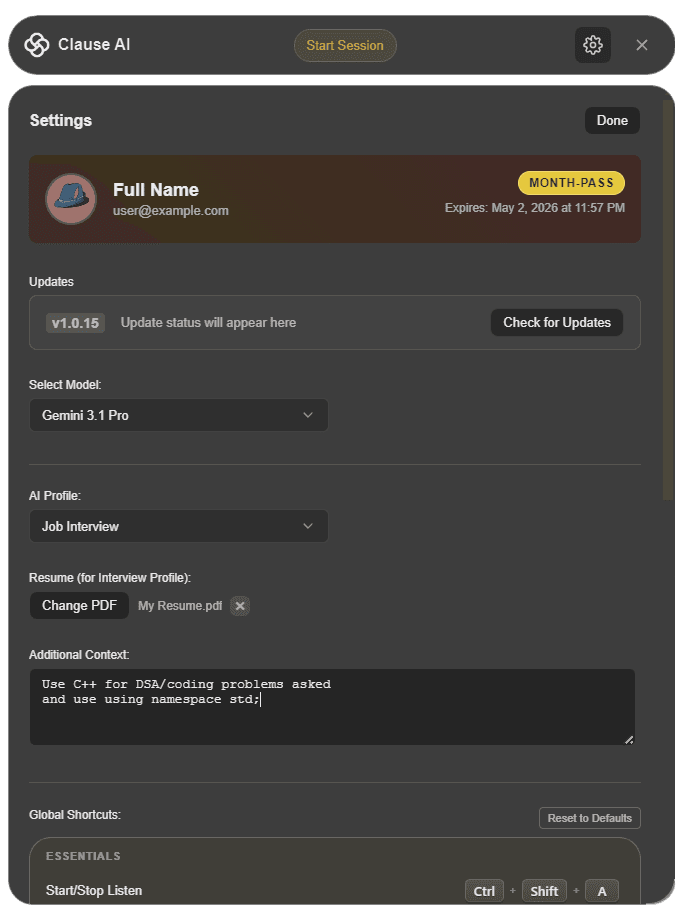
Customize every aspect of your AI assistant to match your needs.
AI Model Selection
Choose your preferred AI model. Currently supports Gemini 3 Flash with more models coming soon. Login required for premium models.
AI Profiles
Switch between specialized profiles like "Job Interview" to get contextually relevant responses tailored to your specific scenario.
Resume Upload
Upload your resume PDF for interview mode. The AI uses your actual experience and skills to craft personalized, authentic responses.
Additional Context
Provide custom instructions like "Use C++ for coding questions" or "I am a frontend developer" to fine-tune AI responses to your background.
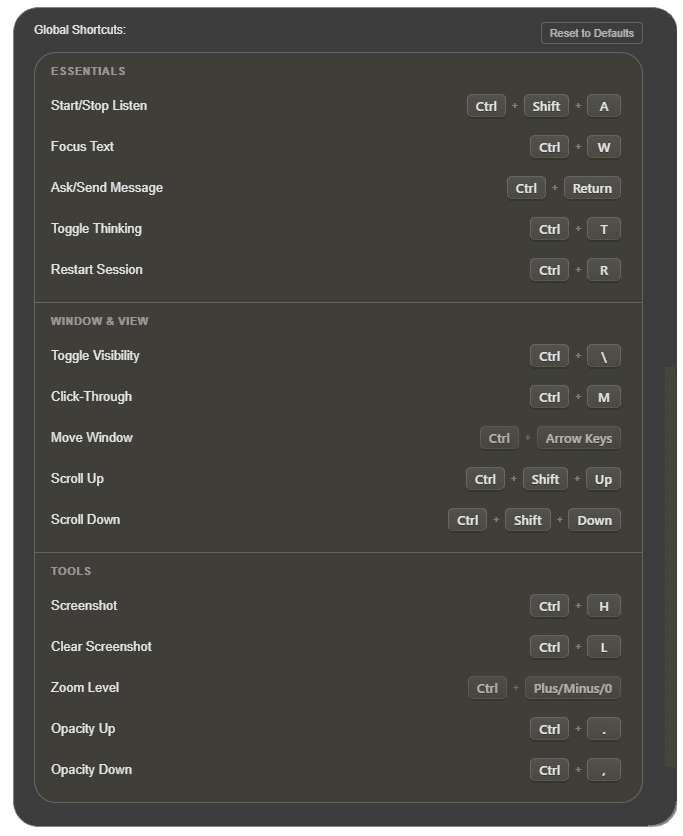
Global Shortcuts
Control everything without leaving your meeting. Every shortcut works globally, even when Clause AI isn't focused.
Essentials
Window & View
Tools
Works Everywhere
Clause AI captures system audio, so it works with any meeting platform.
Zoom
Full support for Zoom meetings, webinars, and breakout rooms
Microsoft Teams
Seamless integration with Teams calls and scheduled meetings
Google Meet
Works flawlessly with Google Meet video conferences
Webex
Compatible with Cisco Webex meetings and events
Discord
Supports Discord voice channels and stage channels
Any Platform
Works with any desktop app that uses audio — it captures system sound
Ready to get started?
Download Clause AI and experience the difference in your next meeting.